![[PukiWiki]](image/pukiwiki.png "[PukiWiki]")
|
XML JAXB |
※ Java 5 以降ならば JAXB2 の方がおすすめ
C:\Sun\jwsdp-1.5\jaxb\lib\*.lib
C:\Sun\jwsdp-1.5\jaxp\lib\*.lib
C:\Sun\jwsdp-1.5\jaxp\lib\endorsed\*.lib
C:\Sun\jwsdp-1.5\jwsdp-shared\lib\*.lib
が必要なようです。それらを外部JARとしてプロジェクトにインポートします
本サイトのXMLSchemaに関するメモ?で作ったXMLSchemaを多少複雑にして操作します。
yamada.xml
<?xml version="1.0" encoding="UTF-8"?>
<employee xmlns:xsi="http://www.w3.org/2001/XMLSchema-instance"
          xsi:noNamespaceSchemaLocation="./example.xsd">
  <name>YAMADA Taro</name>
  <id>1</id>
  <hire>2001-01-01+09:00</hire>
  <telephone>
    <cell>090-1234-5678</cell>
    <office>03-9876-5432</office>
  </telephone>
  <facialPortrait>0102030405060708090A0B0C0D0E0F</facialPortrait>
  <subordinate>SATO Hoshi</subordinate>
  <subordinate>James Tiberius Kirk</subordinate>
</employee>
example.xsd
<?xml version="1.0" encoding="UTF-8" standalone="yes"?>
<!--W3C Schema generated by XMLSpy v2005 sp1 U (http://www.xmlspy.com)-->
<xs:schema xmlns:xs="http://www.w3.org/2001/XMLSchema" elementFormDefault="qualified">
  <xs:element name="employee">
    <xs:complexType>
      <xs:sequence>
        <xs:element name="name" type="xs:string"/>
        <xs:element name="id" type="xs:positiveInteger"/>
        <xs:element name="hire" type="xs:date"/>

        <xs:element name="telephone">
          <xs:complexType>
            <xs:sequence>
              <xs:element name="cell" type="xs:string"/>
              <xs:element name="office" type="xs:string"/>
            </xs:sequence>
          </xs:complexType>
        </xs:element>

        <xs:element name="facialPortrait" type="xs:hexBinary" />
        <xs:element name="subordinate" type="xs:string" minOccurs="0" maxOccurs="unbounded"/>
      </xs:sequence>
    </xs:complexType>
  </xs:element>
</xs:schema><taskdef
name="xjc"
classname="com.sun.tools.xjc.XJCTask"
classpath refid="class.path" />
</taskdef>
<target name="xsd2java">
<xjc target="src" package="hoge.xsd">
<schema dir="schema" includes="*.xsd"/>
<produces dir="src/hoge/xsd" includes="**/*" />
</xjc>
</target>Buildfile: C:\eclipse\workspace\JAXB\build.xml
xsd2java:
[xjc] files are up to date
BUILD SUCCESSFUL
Total time: 13 seconds所定の手続き(1,2)を踏むと、それ以降は通常のBeanを扱うのと同じです。
ソースコード:
public final class UnMarshalXML {
 public static void main(String[] args) throws JAXBException {
   // 1.XMLを解釈するクラスの格納されているパッケージを指定してUnmarshalerを作る
   JAXBContext jc = JAXBContext.newInstance("hoge.xsd");
   Unmarshaller u = jc.createUnmarshaller();
   u.setValidating(false); // 厳密なチェックをしない(手書きのはまず引っかかります)

   // 2.Employeeインタフェースを持つBeanにXMLをマッピング
   Employee employee = (Employee) u.unmarshal(new File("Schema/Yamada.xml"));

   // 3.1.以下getter/setterのある普通のBeanとして値を取り出します
   //     EmployeeTypeだけ見ればいい
   System.out.println("name\t:" + employee.getName());
   System.out.println("id\t:" + employee.getId());
   System.out.println("hired date\t:" + employee.getHire().getTime());

   // 3.2.入れ子はEmployeeTypeのサブクラスであるTelephoneTypeの形で入っている
   TelephoneType tel = employee.getTelephone();
   System.out.println("tel.cell\t:" + tel.getCell());
   System.out.println("tel.office\t:" + tel.getOffice());

   // 3.3.byte配列を受け取ります
   byte[] pictureData = employee.getFacialPortrait();

   if (pictureData != null) {
     System.out.print("picture data\t:");

     for (int cnt = 0; cnt < pictureData.length; cnt++) {
       System.out.print(pictureData[cnt] + ",");
     }

     System.out.println();
   }

   // 3.4.minOccurs/maxOccursを指定するとListになる
   //     どの型でListにはいっているかは、hoge.xsd.EmployeeTypeのJavadocを参照
   List subordinateList = employee.getSubordinate();

   if (subordinateList != null) {
     for (Iterator it = subordinateList.iterator(); it.hasNext();) {
       System.out.println("sub ordinate :" + (String) it.next());
     }
   }
 }
}
実行結果:
name   :YAMADA Taro
id     :1
hired date   :Mon Jan 01 00:00:00 JST 2001
tel.cell     :090-1234-5678
tel.office   :03-9876-5432
picture data :1,2,3,4,5,6,7,8,9,10,11,12,13,14,15,
sub ordinate :SATO Hoshi
sub ordinate :James Tiberius Kirk
ちなみに
Marsha【名】元帥・司令官 【自動】並ぶ・整列する 【他動】並ばせる・整列させる・導く
Unmarshallerというのは、順編成ファイルをメモリにマッピングするようなイメージ
上でも紹介したように、新しくオブジェクトを作るときにはnewするのではなく、
ObjectFactory?.create****()を使う。
最後にBeanをXML化するときにはMarshallerを使います。今回は標準出力に
書き出しましたが、FileOutputStream?に書き出せばファイルに書き出せます。
ソースコード:
public final class MarshalXML {
 public static void main(String[] args) throws JAXBException {
   // 1.新しくJAXBオブジェクトを作るときには、ObjectFactoryを使います。
   //   クラス名が同じものがたくさんあるので、フルパスで型名を書いておくのが吉
   hoge.xsd.ObjectFactory objFactory = new hoge.xsd.ObjectFactory();

   // 2.1.XML文書になるJAXBオブジェクトは create***() で作ります
   Employee employee = objFactory.createEmployee();

   // 2.2.入れ子のJAXBオブジェクトは create***Type() で作ります
   TelephoneType tel = objFactory.createEmployeeTypeTelephoneType();

   // 3.1.後はsetterを使って値を入れていくだけ
   employee.setName("堀衛門");
   employee.setId(BigInteger.valueOf(2L));
   employee.setHire(Calendar.getInstance());
   employee.setFacialPortrait(new byte[] {(byte) 255, (byte) 254, (byte) 253});

   // 3.2.入れ子の場合にもsetterを使います
   tel.setCell("080-1111-1111");
   tel.setOffice("03-9876-5432");
   employee.setTelephone(tel);

   // 3.3.Listの場合には、get*** で List を取得して操作します
   employee.getSubordinate().add("伊勢海老蔵");
   employee.getSubordinate().add("一二三太夫");

   // 4.値の書き込み
   JAXBContext jc = JAXBContext.newInstance("hoge.xsd"); // パッケージ名
   Marshaller m = jc.createMarshaller();
   m.setProperty(Marshaller.JAXB_FORMATTED_OUTPUT, Boolean.TRUE); //改行を入れる
   m.setProperty(Marshaller.JAXB_ENCODING, "Shift_JIS"); //文字コードの指定
   m.marshal(employee, System.out);
 }
}
実行結果:
<?xml version="1.0" encoding="Shift_JIS" standalone="yes"?>
<employee>
   <name>堀衛門</name>
   <id>2</id>
   <hire>2005-01-20+09:00</hire>
   <telephone>
       <cell>080-1111-1111</cell>
       <office>03-9876-5432</office>
   </telephone>
   <facialPortrait>FFFEFD</facialPortrait>
   <subordinate>伊勢海老蔵</subordinate>
   <subordinate>一二三太夫</subordinate>
</employee>
当然、読み込んだXML文書の内容の書き換えも可能です。
属性も子要素もJAXBからの扱いは同じ。
<length unit="m">1.70</length>
            ↓
public class LengthType{
  String getUnit();
  void setUnit(String unit);
  double getValue();
  void setValue(double value);
}


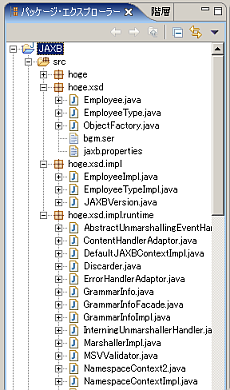
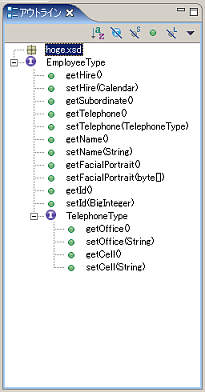
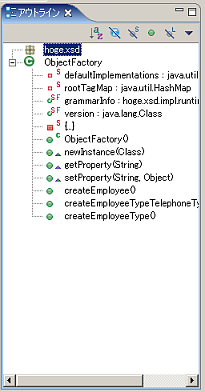
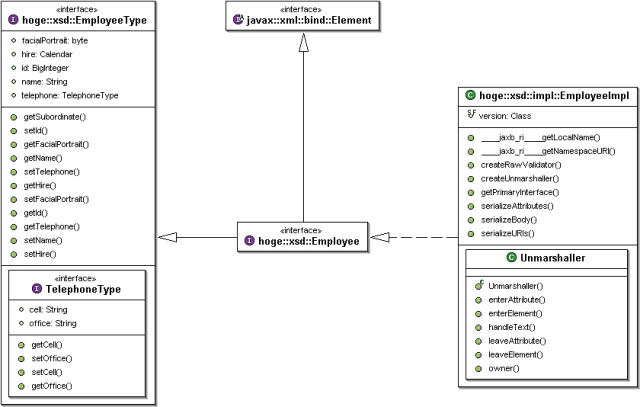
 JAXB3.png
 JAXB2.png
 JAXB_Classes.png
 JAXB1.png


