柿途中
Ansible playbook の構成 †
- GISサーバ構築プロジェクト https://github.com/kagyuu/ansible_gis
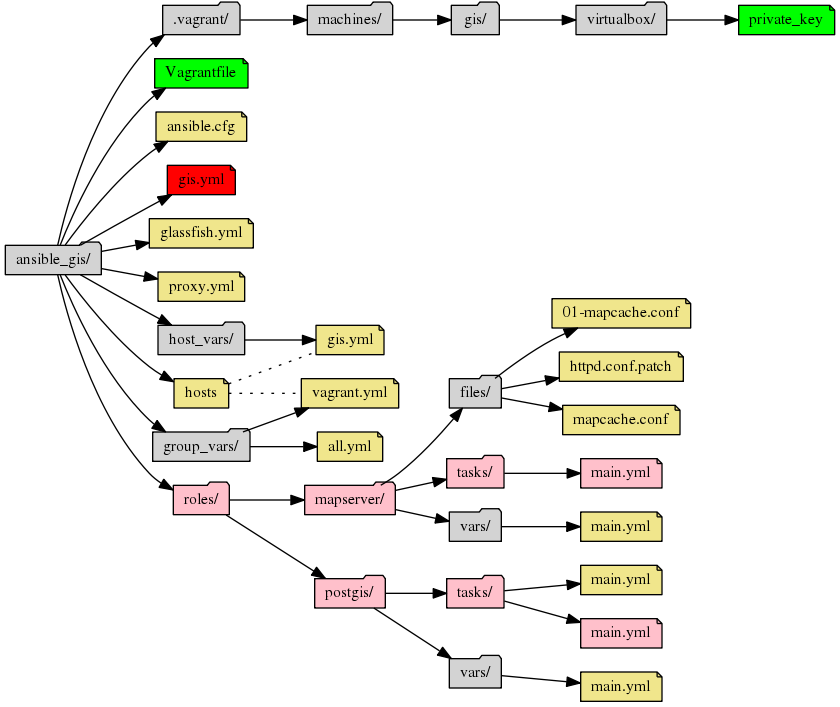
- Vagrant関連
| Vagrantfile | 仮想マシンの構築スクリプト |
| private_key | 仮想マシンヘSSHでアクセスするための秘密鍵 |
- ansbile設定ファイル
| ansible.cfg | ansible全体の設定ファイル |
| hosts | 作成先ホストの定義ファイル |
| group_vars/all.yml | 全マシン共通の設定 |
| group_vars/vagrant.yml | マシングループ "vagrant" の共通設定 |
| hosts_vars/gis.yml | マシン "gis" の設定 |
- ansible-playbook (構築スクリプト)
| gis.yml | CentOS7サーバに gis 関連のミドルウェアをインストールする。内部的には postgis, mapserver, mapcache の構築サブルーチンを呼び出しているだけ |
| glassfish.yml | CentOS7サーバに glassfish をインストールする。内部的には glassfish の構築サブルーチンを呼び出しているだけ。glassfish構築後、postgis への datasource を設定する |
| proxy.yml | gis.yml , glassfish.yml から呼び出される共通初期化処理 (proxy設定を行う) |
| roles/mapserver/tasks/main.yml | mapserver, mapcacheの構築サブルーチン(role) |
| roles/postgis/tasks/postgis.yml | postgis の構築サブルーチン(role) |
- どのプロジェクトでも使うような構築サブルーチン(role)は ansible_common に切り出してある
サブルーチン(role)呼び出しには "引数" を与えることができ、ある程度の汎用化ができる仕組みになっている
- 共通部品 https://github.com/kagyuu/ansible_common
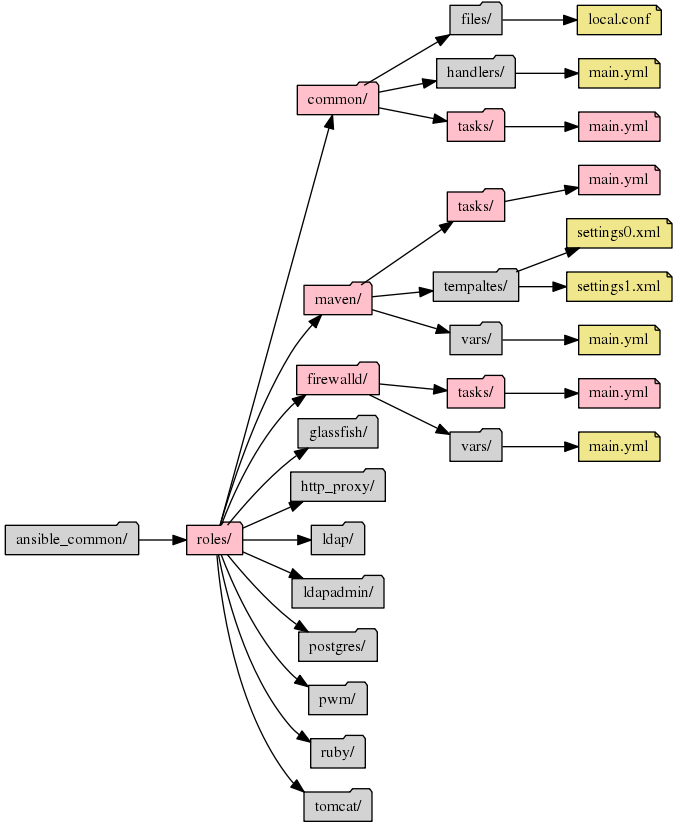
- 全プロジェクト共通サブルーチン(role)
| ansible_common/roles/common/ | CentOS7 の 共通設定サブルーチン |
| ansible_common/roles/maven/ | OpenJDK8 + Maven の 設定サブルーチン |
| ansible_common/roles/firewalld/ | Firewalld の 設定サブルーチン |
| ansible_common/roles/glassfish/ | Glassfish4.1 のインストール |
| ansible_common/roles/http_proxy/ | Apache2.4 の mod_proxy 設定 |
| ansible_common/roles/ldap/ | OpenLDAP の インストール |
| ansible_common/roles/ldapadmin/ | PHPLdapAdmin? のインストール |
| ansible_common/roles/postgres/ | Postgresql のインストール (CentOS Base版 少し古い) |
| ansible_common/roles/pwm/ | PWM (ユーザ情報管理) のインストール |
| ansible_common/roles/ruby/ | Ruby のインストール |
| ansible_common/roles/tomcat/ | Tomcat のインストール |
Vagrant と Ansible について †
[defaults]
inventory = hosts
host_key_checking = False
pipelining = True
[vagrant]
gis
インストールするホストとグループを定義する。ansible.cfg に定義されている hostsファイル
本番環境では、ある程度設定内容が共通なものをグループ化して
[web]
web1
web2
web3

[db]
db1
db2
というようにする。
---
COLON: ':'
MINUS: '-'
共通設定。エスケープ文字を定義する
---
ansible_ssh_user: vagrant
Vagrantグループ共通の設定
---
ansible_ssh_host: 127.0.0.1
ansible_ssh_port: 2222
ansible_ssh_private_key_file: .vagrant/machines/gis/virtualbox/private_key
gisサーバ固有の設定。
gisサーバの設定は all + Vagrantグループの設定内容 + gisサーバ固有の設定
今宵はここまで †
メイン部 (gis.yml) †
サブルーチン部 (roles/) †
共通サブルーチンについて (ansible_common/roles/) †
最初から最後まで流しで見てみる †
Ansible
